Ready
Talkie wakes up on “Hey Talkie”, answers out loud and gets things done: opens apps, controls music, sets reminders, helps you study. The language model runs on your own computer – and Talkie speaks your language.
97 tools · local language model · 6 languages
Most voice assistants send every question to the cloud. And on your own computer, they can do surprisingly little.
-
Everything in the cloud
What you ask is processed on someone else’s servers. You can’t see what happens to your data.
-
Expensive subscriptions
Many AI assistants cost 20 dollars or more a month – because every question costs money on their servers.
-
No access to your PC
Opening apps, finding files, controlling windows: that’s exactly where most assistants stop.
This is Talkie on your screen.
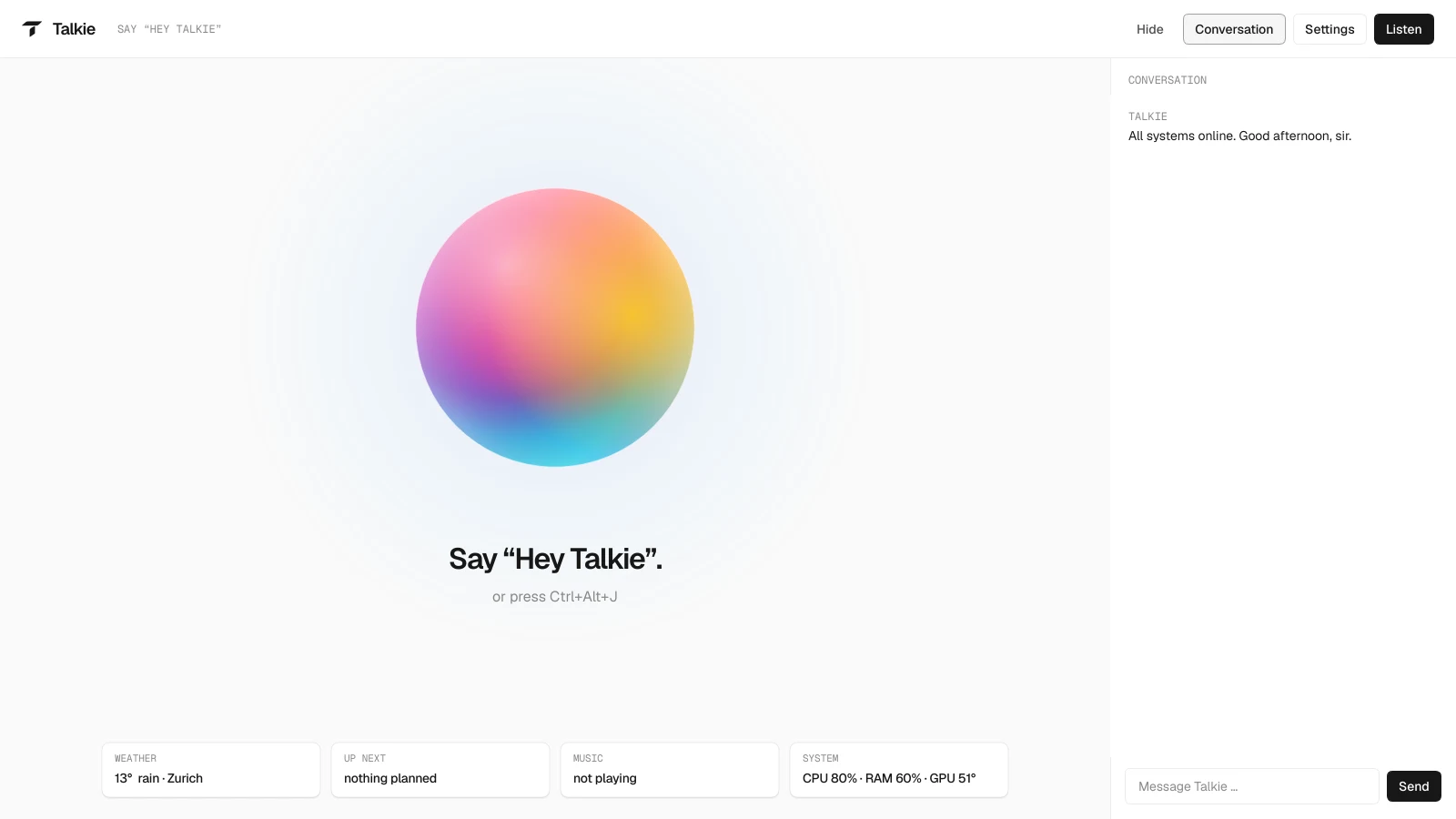
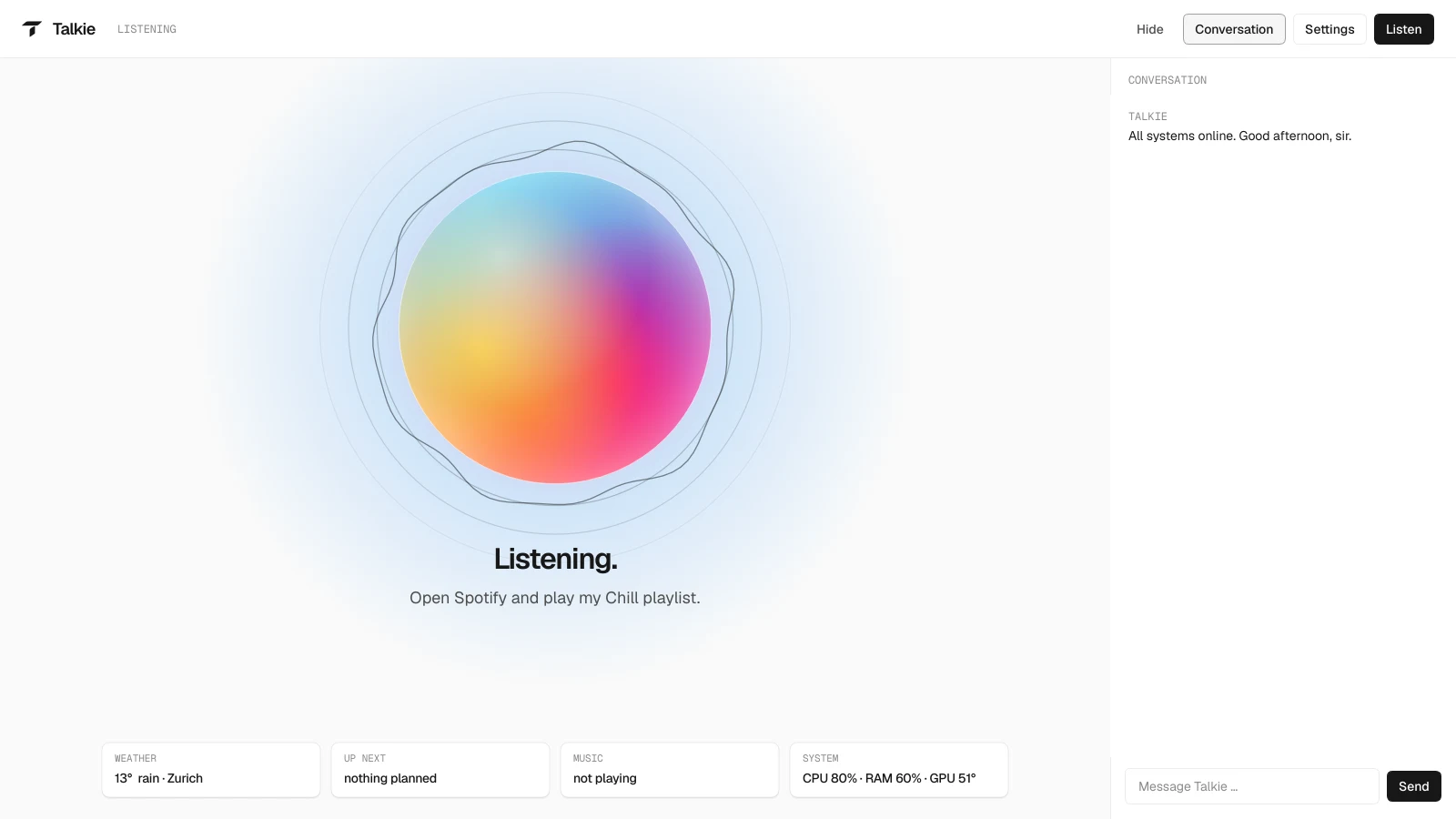
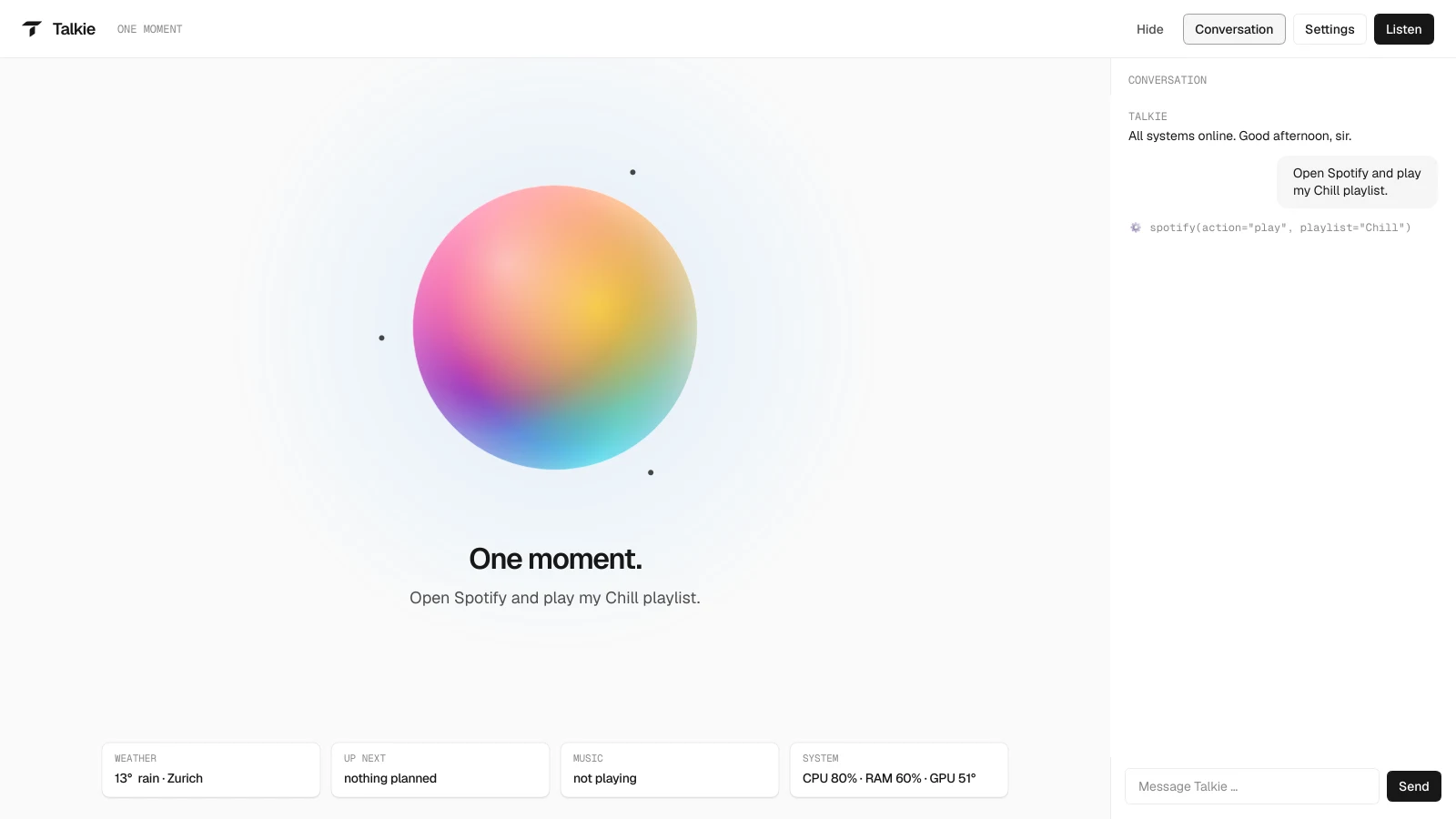
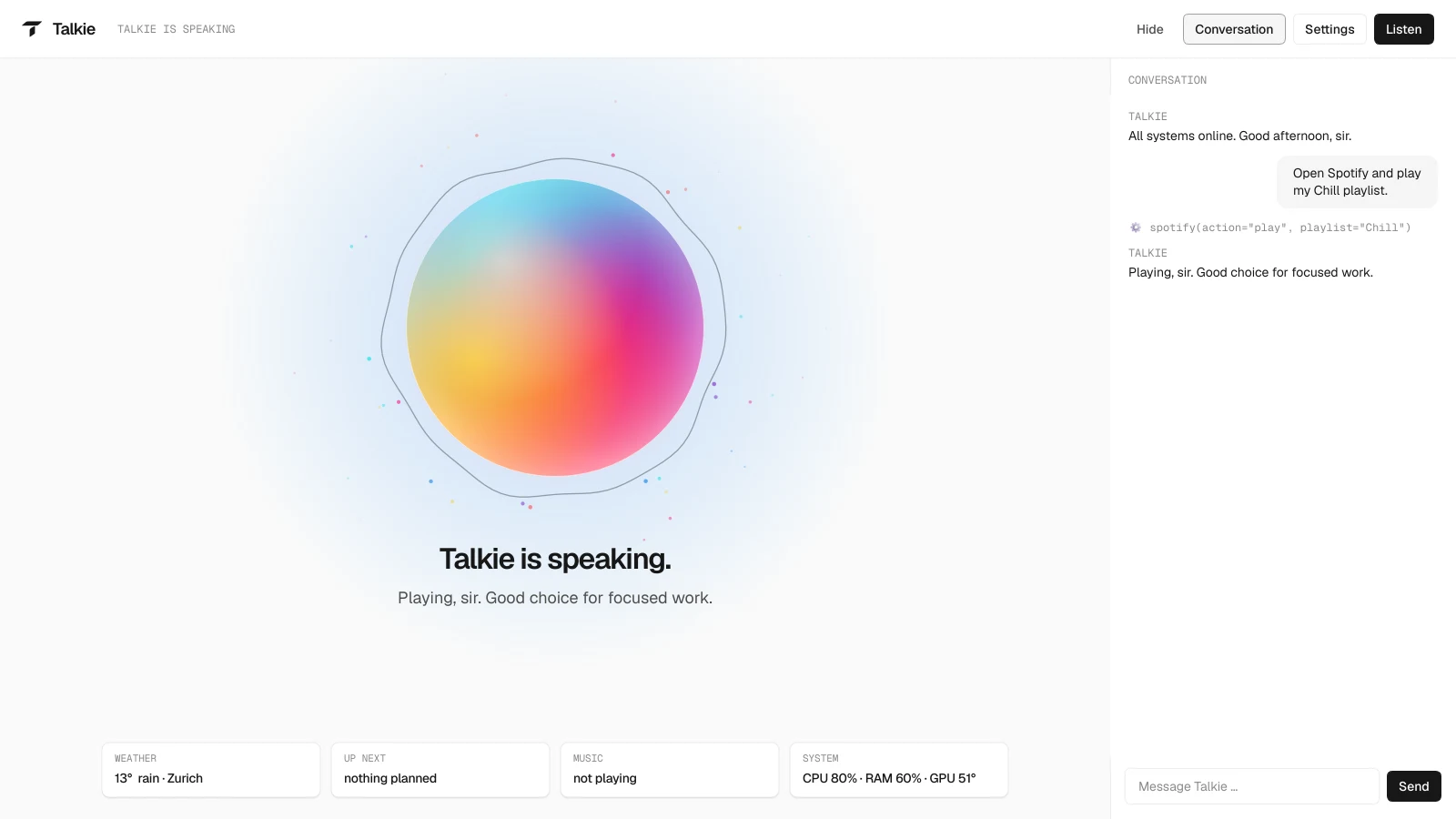
Real captures from the app, nothing mocked up. Calm and light so Talkie never gets in the way – the cards show live values: the weather in Zurich and the CPU, RAM and GPU load of the development PC.
-
Ready
Waits for “Hey Talkie” or Ctrl+Alt+J.
-
Listening
Records until you pause for a moment.
-
Thinking
The language model picks the right tool.
-
Speaking
The orb moves with the voice.
Up close.
Shows at a glance what Talkie is doing: breathes calmly when ready, sends out ripples while listening, circles dots while thinking and moves with its voice.
Weather, next appointment, music and system load – or the task Talkie is working on in the background.
What you said, what Talkie answers – and every tool it uses to do it. You can also type to Talkie here.
What is happening right now, plus the buttons Listen, Settings, Conversation and Hide. Hidden, Talkie keeps running in the system tray.
Answers you can see.
Talkie shows answers as 3D holograms on a dark stage in its window – rotate them with the mouse or by voice: “zoom in”, “turn left”, “take it apart”. These are real recordings from the app.
-
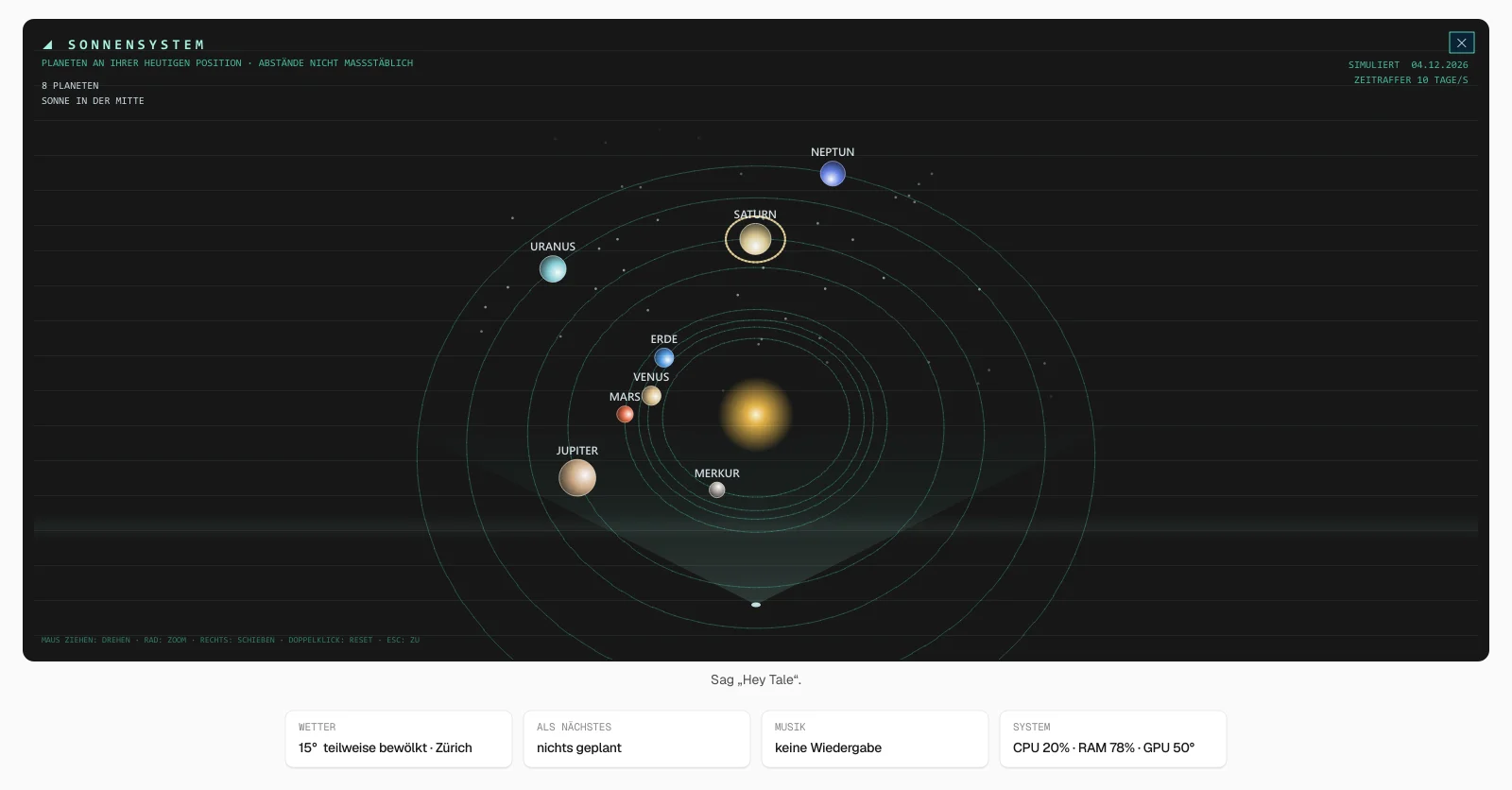
Show me the solar system.
show_space(solar)
The planets sit where they really are today and trace their orbits in time-lapse – ten days per second.
-
Where is Zurich on the globe?
show_space(earth, "Zürich")
Country borders, a marker for the place and the real day/night line of right now.
-
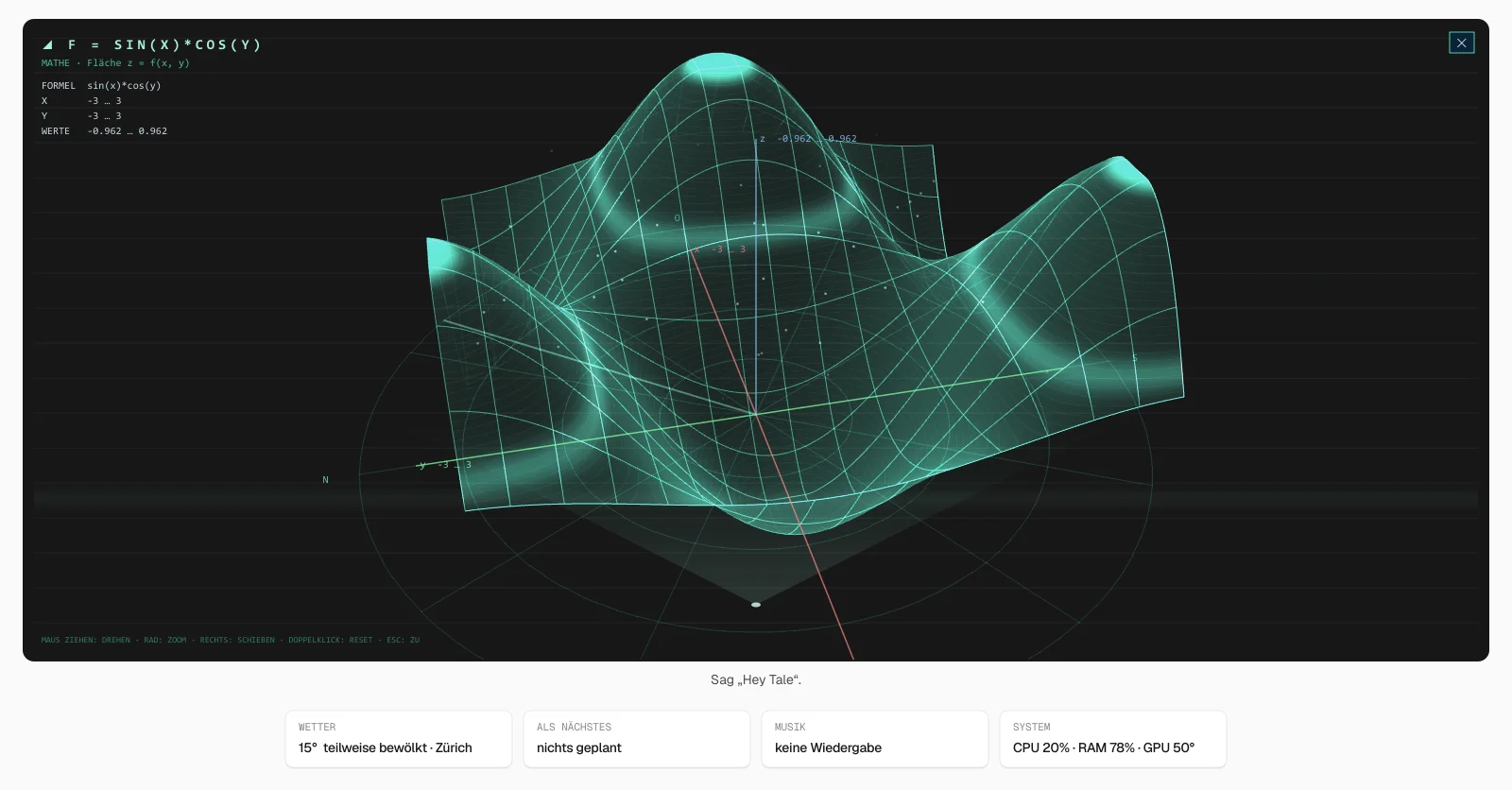
Plot sin(x) times cos(y).
plot_3d("sin(x)*cos(y)")
Maths functions as 3D surfaces or curves, with axes and value range – great for studying.
Also: 3D models of objects and landmarks (show_hologram) and places nearby as a map (places_nearby).
Say it. Talkie does it.
- “Open Spotify”
- “Timer 10 minutes”
- “What’s the weather tomorrow?”
- “Quiz me on my French vocab”
- “Remind me at 6 pm to …”
- “Volume to 30”
- “What’s on today?”
- “Show me the solar system”
- “Write an email to …”
- “Focus mode”
A conversation. Not a form.
Real tool names from the code, answers as an example.
-
You: Hey Talkie, what’s on today?
- daily_briefing()
-
Talkie: Good morning, sir. Here is your day …
-
You: Delete the file “old draft”.
- file_action(delete) → CONFIRMATION NEEDED
-
Talkie: Do you really want me to delete “old draft”?
-
You: Yes.
-
Talkie: Done – it’s in the recycle bin.
Talkie. An assistant that works for you.
An AI butler with style: calm, quick-witted, loyal. Talkie runs in the background, reacts to your voice or a hotkey and has real access to your PC – and asks before anything that changes something.
- Thinks on your PC
- Language model (Ollama), speech recognition (Whisper), wake word and voice run locally. Only what a feature needs goes online – the weather or a web search, for example.
- Gets to know you
- How to address you, your birthday, your hobbies: Talkie remembers what you tell it. In the settings window you can see and delete every entry.
- Asks before it acts
- Deleting files, closing apps, shutting down the PC: Talkie waits for your “yes”. Dangerous commands are blocked.
Everything Talkie can do.
-
Open apps and websites, switch windows, type, take screenshots, change volume or dark mode – find, tidy up and convert files (PNG to JPG, merge PDFs) and install or update programs.
Tools: open_app · find_files · convert_file · software
-
Timers, reminders, calendar, to-dos, a budget and break reminders. Say “good morning” and Talkie sums up weather, appointments and tasks – and tells you when to take an umbrella. Your own routines put several actions on one word, like “gaming mode”.
Tools: set_timer · calendar · daily_briefing · routine
-
Takes notes of lessons and lectures and summarises them, makes flashcards with a review schedule, quizzes you and keeps you on track in focus mode. Plus your timetable and grades – including the grade you need in the next test to reach your target average.
Tools: transcript · flashcards · focus_mode · grades
-
Weather, news, web search, Wikipedia, Swiss train and tram connections, exchange rates and units – from real sources instead of guesses. It also finds answers in your own documents, notes and PDFs.
Tools: get_weather · news · public_transport · currency
-
Interprets conversations in ten languages, shows live subtitles for any video, controls Spotify, Philips Hue and Home Assistant.
Tools: interpreter · subtitles · spotify · smart_home
-
On a dark stage in its window, Talkie shows 3D models, planets, function graphs and places nearby – perfect for having things explained.
Tools: show_hologram · show_space · plot_3d · places_nearby
-
Dictate instead of typing, have highlighted text corrected or translated, save letters and essays as files. Read and answer emails, prepare WhatsApp messages and send links to your phone via push.
Tools: dictation · replace_selection · email · send_to_phone
-
Reads out what’s on your screen, describes images and photos and clicks the buttons you name. If you like, Talkie watches while you work and points out mistakes in your text.
Tools: read_screen · look_at · mouse · work_watch
-
Bigger jobs like “compare three laptops and write the results into a document” run in the background while you keep working. Talkie recognises your family’s voices and remembers what you did last week.
Tools: background_task · read_document · voices · diary
What stays on your PC. And what doesn’t.
No small print: here is every service Talkie talks to – and why.
Stays on your PC
- Language model Qwen3 8B via Ollama
- Speech recognition faster-whisper
- Wake word “Hey Talkie” faster-whisper
- Voice (10 languages) Qwen3-TTS
- Memory, notes, settings folder data\
Data is only stored in this folder on your PC – not on anyone else’s servers. Delete it and everything is gone.
Goes online – only when needed
- Weather MET Norway
- Web search DuckDuckGo
- News · knowledge Google News · Wikipedia
- Trains & trams (CH) transport.opendata.ch
- Places · exchange rates OpenStreetMap · Frankfurter
Only if you set them up: Spotify, email, messages to your phone (ntfy) and smart home (directly on your home network).
Make it yours.
Language, how Talkie addresses you, its voice, how cheeky it may be and how it looks – 11 interfaces and 13 orb styles: you set all of it in the settings. They open by themselves on first launch, and changes apply immediately. Try it here.
- General
- Voice
- Listening
- Personality
- Appearance
- Privacy
At your service, Sir.
All systems online.
Dry wit like a British butler: fine irony, understatement.
Try it: this preview is rebuilt on the website and works like the settings in the app.
Ready in three steps.
-
Buy
Pay – your download link and licence key arrive by email.
- Step 1
- Download
- Licence key
-
Install
Double-click Talkie-Setup.exe. The installer sets up Python 3.13, Ollama, the language model, the local voice and every package, and puts Talkie on your desktop and in the Start menu.
- depends on your connection
- One double-click
- Automatic
-
Get going
On first launch you enter your licence key, then Talkie asks how to address you and where you live. Then say “Hey Talkie” or press Ctrl+Alt+J.
- Right away
- Voice
- Hotkey
- Settings
Honest numbers.
Measured on the development PC: AMD Ryzen 7 7800X3D, 32 GB RAM, NVIDIA RTX 5070 with 12 GB. Talkie has not yet been tested on weaker PCs.
- Tools
-
97
Counted in the code – from timers to a live interpreter
- Disk space
-
approx. 18 GB
Packages 7.9 GB · language model 5.2 GB · voice 2.4 GB · speech recognition 1.6 GB · search 0.6 GB
- GPU memory
-
12 GB
Language model, voice and speech recognition use about 11 GB together. Without an NVIDIA GPU: CPU and the basic Windows voice – slower
- Operating system
-
Win 11
Tested on Windows 11, with microphone and speakers
- Talkie
-
- Local language model Qwen3 via Ollama and Whisper run on your PC.
- 97 tools From timers to a live interpreter – counted in the code.
- Speaks your language English, German, French, Spanish, Italian or Portuguese – with a natural voice.
- Installer included One double-click sets up Python, Ollama and every package.
- Building blocks
-
- Ollama
- Qwen3 8B
- faster-whisper
- Qwen3-TTS
- PySide6
Which Talkie is right for you?
Start small. Cancel anytime.
Monthly or buy once – the language model runs on your own computer, so it stays affordable. For Windows, Mac coming soon.
Cancel monthly. Updates while your subscription runs.
Pay once, keep it forever.
Launch offer · Introductory prices on one-time purchases until 10 November. The first 100 buyers save another 5% at checkout with the code LAUNCH.
-
Basic
To get startedCHF 4.90
per month, incl. VAT
Start subscriptionBuy nowCHF 26.10 CHF 29
Introductory price until 10 November, then CHF 29 · one-time, incl. VAT
Included with Basic
- 1 computer – Windows (Mac coming soon)
- The essential skills: apps, weather, search, timers, music, calendar
- Local language model, six languages
- Help by email
-
Plus
RecommendedCHF 9.90
per month, incl. VAT
Start subscriptionBuy nowCHF 39.20 CHF 49
Introductory price until 10 November, then CHF 49 · one-time, incl. VAT
Included with Plus
- 3 computers
- All 97 skills, holograms, study help, interpreter
- Four natural voices (NVIDIA graphics card)
- Priority help by email
-
Max
For familiesCHF 19.90
per month, incl. VAT
Start subscriptionBuy nowCHF 79.20 CHF 99
Introductory price until 10 November, then CHF 99 · one-time, incl. VAT
Included with Max
- 5 computers – also for your family in the same household
- Everything in Plus
- New features first (early-access builds)
- Personal help within 24 hours
Will Talkie run on your PC?
The free check tests Windows, memory, disk space, graphics card and microphone – without installing anything.
3-day money-back guarantee. After payment you receive the download link and your licence key by email – or simply sign in to the app with your account. Subscriptions renew every month and can be cancelled anytime, effective at the end of the paid month. Depending on your country a different tax may apply at checkout; the final price is shown before you pay. By buying you accept the terms and the privacy policy.
Questions & answers.
Your question isn’t here? Write to us at support.talkie@gmail.com.
Which languages does Talkie speak?
You pick the main language in the settings: English, German, French, Spanish, Italian or Portuguese. Talkie then listens and answers in that language, and the app interface follows it too. On top of that it can say sentences in Russian, Chinese, Japanese or Korean – for example when you ask how to say “good night” in Japanese. There are four natural voices – each speaks every language like a native speaker, without an accent. They need an NVIDIA graphics card.
How do you pronounce Talkie?
Like the English word “tile” – or the German word “Teil”. You wake Talkie with “Hey Talkie” or Ctrl+Alt+J, and you can add the command right away: “Hey Talkie, öffne Spotify.”
Do I need an internet connection?
Not for the conversation itself: language model, speech recognition and voice run on your PC. Talkie only needs the internet for features like weather, news, web search or train connections.
Does Talkie run without a graphics card?
Yes. Without an NVIDIA GPU, Talkie computes on the CPU, uses a smaller speech recognition model and speaks with the basic Windows voice. It works, but answers take noticeably longer.
Is Talkie available for Mac?
Soon. The Mac version for Macs with Apple silicon (M1 or newer) is in the works and will be included in every plan, including Basic. If you buy now, you can use it at no extra cost once it is out. It will do a little less than the Windows version (e.g. no holograms and no window control). There is no Linux version.
What happens to my data?
Memory, notes, diary and settings live in the data folder on your PC. You can see and delete what Talkie remembers about you under “Memory” in the settings. Which services go online is listed under Privacy above.
Can Talkie break something on my PC?
Before anything that changes something – deleting files, closing apps, shutting down the PC – Talkie asks and waits for your “yes”. Deleted files go to the recycle bin. Dangerous commands are blocked.
Can I choose what Talkie calls me?
Yes. In the settings window you pick how Talkie addresses you – your first name, “Sir”, “Boss” or something of your own – and add your birthday, hobbies or where you live. Humour, voice and appearance can be adjusted too.
How much disk space does Talkie need?
About 18 GB: packages 7.9 GB, language model 5.2 GB, voice 2.4 GB, speech recognition 1.6 GB, search model 0.6 GB. The installer downloads everything automatically. In return, everything – including the voice – runs on your PC without an online service.
How do I know whether Talkie runs on my PC?
Download the free PC check before buying (its messages are in German). It checks Windows version, RAM, disk space, graphics card and microphone – without installing or changing anything.
Can I return Talkie?
Yes. If you’re not happy, email us within 3 days of purchase with your order number – you get the full price back, no reason needed. After that: if Talkie does not work properly on a PC that meets the system requirements and we cannot fix the problem, we refund you as well. Tip: check your PC first with the free PC check.
How many computers may I use Talkie on?
Basic on 1 computer, Plus on 3, Max on 5 – with Max also for people in your household. After purchase you sign in to Talkie with your account or enter the licence key from the email. New computer? Free up a slot at talkie.ch/account or write to us. Passing it on or reselling it is not allowed.
What is the difference between Basic, Plus and Max?
Basic has the essential skills and answers fastest, even on weak laptops. Plus has all 97 skills and works on 3 computers. Max works on 5 computers, gets new features first and personal help within 24 hours. Every plan is available as a monthly subscription or a one-time purchase.
Subscription or one-time purchase – which is better?
The subscription is cheap to try, can be cancelled anytime and includes all updates while it runs. After cancelling, Talkie keeps working until the end of the paid month. The one-time purchase works forever; with Basic you get updates released within 12 months, with Plus and Max all updates for as long as we keep developing Talkie.
Questions? Write to us.
Before buying or during installation: tell us briefly what it’s about. We’ll get back to you by email – in English or German.
Or directly support.talkie@gmail.com